Teacher Touch Tomorrow Today SVG Design
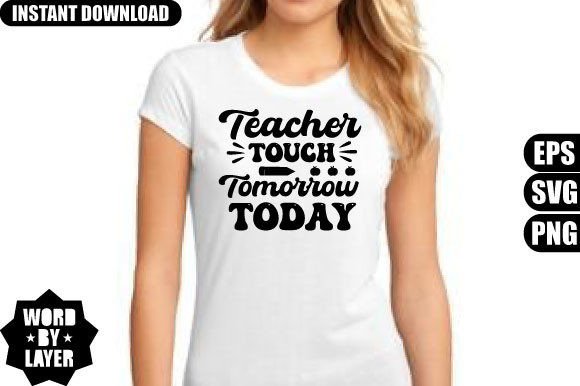
“Teacher Touch Tomorrow Today” isn’t just a phrase—it’s a quiet promise, a reminder of the lasting imprint educators leave on young minds. This SVG design transforms that sentiment into a clean, versatile digital asset: a layered, word-by-word cut file built for crafters, teachers, small business owners, and creative professionals who value clarity, intention, and ease of use.
What You’re Actually Getting
Your download is a single .zip file containing three essential formats:
- One SVG file, structured word-by-layer—ideal for precise cutting with Cricut Design Space, Silhouette Studio, or other cutting software. Each word (e.g., “Teacher”, “Touch”, “Tomorrow”, “Today”) sits on its own layer, giving you full control over spacing, sizing, color, and sequencing.
- One high-resolution PNG (300 DPI, transparent background), perfect for mockups, social media posts, printable cards, or digital presentations—no need to trace or remove backgrounds.
- One EPS file, an editable vector format compatible with Adobe Illustrator, Inkscape, and Photoshop. Resize it infinitely without pixelation, adjust anchor points, or convert text to outlines for professional printing.
No physical item ships. This is a digital download only—ready in seconds, usable immediately, and stored securely in your library for future projects.
For Teachers & Educators
You might be designing a classroom banner, personalizing a tote bag for Teacher Appreciation Week, or creating a heartfelt gift for a colleague. With this design, you don’t need design experience—just open the SVG in Cricut Design Space, delete or rearrange words to fit your project, and cut. The layered structure means you can highlight “Teach” in bold while keeping “Tomorrow Today” subtle—or isolate “Touch” for a minimalist wall quote. It’s meaningful content, made practical.
For Small Business Owners & Print-on-Demand Sellers
If you run a teacher-themed shop on Etsy, Redbubble, or Shopify, this SVG saves time and strengthens consistency. Use the EPS file to adapt the layout for different shirt sizes (e.g., stacked for youth tees, horizontal for adult crewnecks). Pair the PNG with lifestyle photos for Instagram ads. Because the words are separated, you can easily create variations—“Teach Love Inspire”, “First Grade Teacher”, or “Back to School 2024”—without redrawing anything. That flexibility supports branding and seasonal launches without extra design fees.
For Hobbyists & Beginners
You’ve just bought your first Cricut and want something uplifting but not overwhelming. This SVG works right out of the box: upload it, select your material, and cut. No grouping, ungrouping, or troubleshooting missing fonts. Since each word is pre-isolated, you won’t accidentally cut “Tomorrow” twice or misalign layers. And if you’re still learning how to weld or contour in Silhouette Studio, the clean vector paths reduce trial-and-error. It’s a gentle entry point—meaningful, manageable, and mistake-tolerant.
For Designers & Freelancers
You’re building a teacher SVG bundle for clients or your own marketplace store. This file gives you a polished, production-ready component. The EPS ensures fidelity across print vendors. The layered SVG lets you offer customization options (e.g., “choose which words to include”) without rebuilding from scratch. You can also combine it with complementary elements—chalkboard textures, apple icons, or watercolor splashes—knowing the typography remains crisp and editable at every stage.
How Priorities Shift Across Use Cases
What makes this SVG valuable depends on what you’re trying to do—and how much time, skill, or budget you have.
- Ease of use matters most if you’re cutting tonight for tomorrow’s staff meeting. The word-by-layer setup eliminates guesswork—no manual separation needed.
- Quality and scalability matter when ordering vinyl decals for school signage or preparing files for DTG (direct-to-garment) printing. The EPS and 300 DPI PNG ensure sharp edges and smooth curves at any size.
- Flexibility is key if you plan to reuse the design across formats—stickers, mugs, lesson plans, Zoom backgrounds. Being able to toggle visibility per word or recolor individual elements opens up dozens of applications.
- Commercial reliability matters to sellers: this file has no embedded fonts or raster effects, so it renders consistently across platforms and devices. No hidden licensing surprises—it’s yours to use in physical products you make and sell.
Real Projects, Real Uses
A first-grade teacher printed the “Teacher Touch Tomorrow Today” design onto iron-on vinyl and applied it to denim aprons for her students’ science station. She used only “Touch” and “Today” on smaller patches—keeping it age-appropriate and tactile.
A freelance graphic designer used the EPS version to build a matching set of teacher appreciation cards: one card featured all four words; another used just “Tomorrow Today” beneath a hand-drawn sun illustration.
A homeschool mom cut the SVG from glitter cardstock and mounted each word onto wooden blocks—creating a hands-on spelling and values activity for her kids.
A boutique owner ordered heat-transfer vinyl in navy and gold, then used the layered SVG to align “Teacher” and “Today” on the front of crewneck sweatshirts, leaving “Touch Tomorrow” as a subtle back-neck detail.
Does This Fit Your Needs?
This SVG design shines when you want meaning *and* functionality—not just decoration. If you need a ready-to-cut file that respects your time, adapts to your tools, and stays true to its message, it’s a strong match.
It’s less ideal if you’re looking for a fully illustrated scene (e.g., a chalkboard with doodles), animated versions, or font-only files without vector outlines. It doesn’t include alternate typefaces or color palettes—but because it’s layered and vector-based, you can add those yourself in seconds.
You don’t need advanced skills to start. You do need a basic understanding of how to import and manipulate SVGs in your preferred software—which applies whether you’re using Cricut, Silhouette, or free tools like Inkscape. If you’ve ever resized a shape or changed a fill color, you’re already equipped.
And because it’s digital, you can test it on scrap material before committing—no shipping delays, no restocking fees, no waiting for inventory. Just open, adjust, cut, and wear, display, or share.