100 Editable Canva KDP Interiors: Smart, Print-Ready Tools for Real Creators
If you're building a KDP business—or expanding your creative toolkit—you've likely seen listings for “100 Editable Canva KDP Interiors.” At first glance, it sounds like a time-saving goldmine: high-quality, customizable interiors, ready for Amazon publishing. And it *can* be—if you know what’s actually included, how to verify quality before purchase, and how to use the files without hitting common roadblocks.
What “100 Editable Canva KDP Interiors” Really Means (and What It Doesn’t)
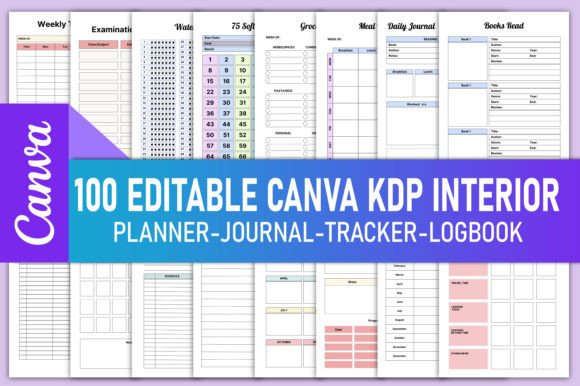
This bundle isn’t just 100 random pages—it’s a curated set of interior templates designed specifically for Kindle Direct Publishing, with each file optimized for print-on-demand standards: bleed-safe margins, CMYK-ready color profiles (where applicable), and 300 DPI resolution. You receive print-ready PDFs and editable Canva links—so you can personalize fonts, colors, layout spacing, and even swap icons or illustrations before exporting.
But here’s where confusion starts: many buyers assume “editable in Canva” means full design freedom—like changing page size or adding new sections on the fly. That’s not always true. Some sellers lock layers, use non-standard fonts that don’t render correctly in Canva’s free tier, or embed rasterized graphics instead of vector elements. The result? A template that looks great in the preview—but breaks alignment when edited, or exports blurry at print size.
Three Overlooked Details That Make or Break Your KDP Launch
1. Page count ≠ usable content
Not all 100 pages are unique or production-ready. For example, a “2024 Mental Health Planner” may include 12 monthly spreads, 52 weekly logs, and 36 daily reflection prompts—but if the prompts repeat across multiple journals (e.g., identical questions in both the Anxiety Depression Workbook and the Selfcare Gratitude Journal), you’re not getting 100 distinct interiors—you’re getting redundancy masked as volume. Always check the seller’s detailed breakdown. Look for variety in structure: bullet journal layouts vs. lined note pages vs. habit trackers with checkboxes vs. illustrated therapy worksheets.
2. “Editable” doesn’t mean “plug-and-play for beginners”
Canva is intuitive—but editing a 100-page planner requires knowing how to duplicate pages efficiently, manage master layers, and export multi-page PDFs without blank pages or misaligned crop marks. If you’re new to Canva, test one interior first: try changing the header font, adjusting margin guides, and exporting a single page as PDF. If text shifts unexpectedly or images pixelate, the file wasn’t built with KDP workflows in mind.
3. Date-sensitive planners need flexible year ranges
A “2024 Homeschool Planner” is useful only until December 2024—unless it’s truly date-agnostic. Better bundles include versions labeled “2024–2025 Homeschool Planner” and “2024–2025 Study Planner,” with blank date fields or modular calendars you can relabel. Even better: planners with quarterly or semester-based layouts instead of fixed month grids. That way, you’re not discarding half your inventory every January.
Why These Mistakes Cost More Than Time
Using low-fidelity interiors leads to real consequences—not just aesthetic ones. Blurry charts or inconsistent line weights trigger Amazon’s automated quality review, delaying your book’s go-live by days or weeks. Repeated formatting fixes eat into profit margins: if editing one journal takes 3 hours instead of 45 minutes, you’ve just added $60+ in opportunity cost (based on average freelance design rates). Worse, mismatched typography or cramped margins reduce usability—readers skip pages, leave negative reviews about “hard-to-write-in” layouts, and request refunds.
Take the ADHD Cleaning Schedule, for instance. A well-designed version uses bold visual cues (color-coded zones, large checkbox circles, minimal text), clear hierarchy, and generous white space. A poorly adapted one might cram 7 tasks into one row with tiny fonts—defeating its core purpose. Same goes for the Blood Sugar Logbook: inconsistent grid spacing or missing unit labels (mg/dL vs. mmol/L) confuse users and erode trust in your brand.
How to Choose—and Use—These Interiors Wisely
Before downloading or purchasing, ask yourself three questions:
- Is the file structure transparent? Look for a clear index: e.g., “#1–10: Daily Positivity Journal (lined + dotted + blank variants), #11–25: Gratitude Journal (prompt-based + reflection + habit tracker).” Vague descriptions like “100 planner pages” are red flags.
- Does the Canva link open in edit mode—without requiring premium fonts or Pro features? Try opening it in an incognito window. If you see “Upgrade to Pro” warnings or missing typefaces (e.g., “Montserrat” showing as Times New Roman), contact the seller first.
- Are print specs documented? Confirm bleed (0.125”), safe zone (0.25”), and trim size (e.g., 8.5" × 11", 6" × 9") match your KDP project. Bonus points if the seller includes a test print checklist PDF.
Once you have the files, start small. Pick one planner—say, the Act of Kindness Journal—and customize just the cover, intro page, and first weekly spread. Export, upload to KDP’s previewer, and scroll through. Does text wrap cleanly? Do checkboxes align vertically across pages? Does the footer stay fixed? Fix those before scaling to the full 100.
Real Value Isn’t in Quantity—It’s in Fit
You don’t need 100 interiors to launch five strong KDP titles. You need five interiors that serve specific, underserved audiences well: the Autism Planner with sensory regulation trackers, the Candle Business Planner with wick-sizing logs and fragrance oil inventory tables, the Dream Journal with rapid-recall prompts and mood-tagging icons. That’s where this bundle shines—not as a bulk download, but as a library of thoughtfully structured starting points.
When used intentionally, 100 Editable Canva KDP Interiors saves hours of design work, reduces formatting errors, and helps you focus on what matters most: writing meaningful prompts, refining therapeutic frameworks, or tailoring content for niche communities. Just remember: the best tool isn’t the one with the most pages. It’s the one that works—consistently, quietly, and exactly as promised.